> ## Documentation Index
> Fetch the complete documentation index at: https://docs.messari.io/llms.txt
> Use this file to discover all available pages before exploring further.
# Watchlists
# **Watchlists Overview**
Messari Watchlists allow you to monitor and track assets of interest. In addition to being your personal market monitor, you can use Watchlists to filter pages across the site. This allows you to view [Key Developments](https://messari.io/intel), [News](https://messari.io/news), [Research](https://messari.io/research), and more for *only* the assets you care about.
Finally, you can use your Watchlists to schedule customized Messari AI Digests. These are a daily or weekly summary of key qualitative information based on your assets.
This page includes a step-by-step guide on getting the most from **Messari's Watchlists**.
# **Creating a New Watchlist**
Watchlists can be created and edited from the Messari [Homepage](https://messari.io/) or the [Watchlist](https://messari.io/watchlists) page for a full screen view.
## **Homepage Watchlist**
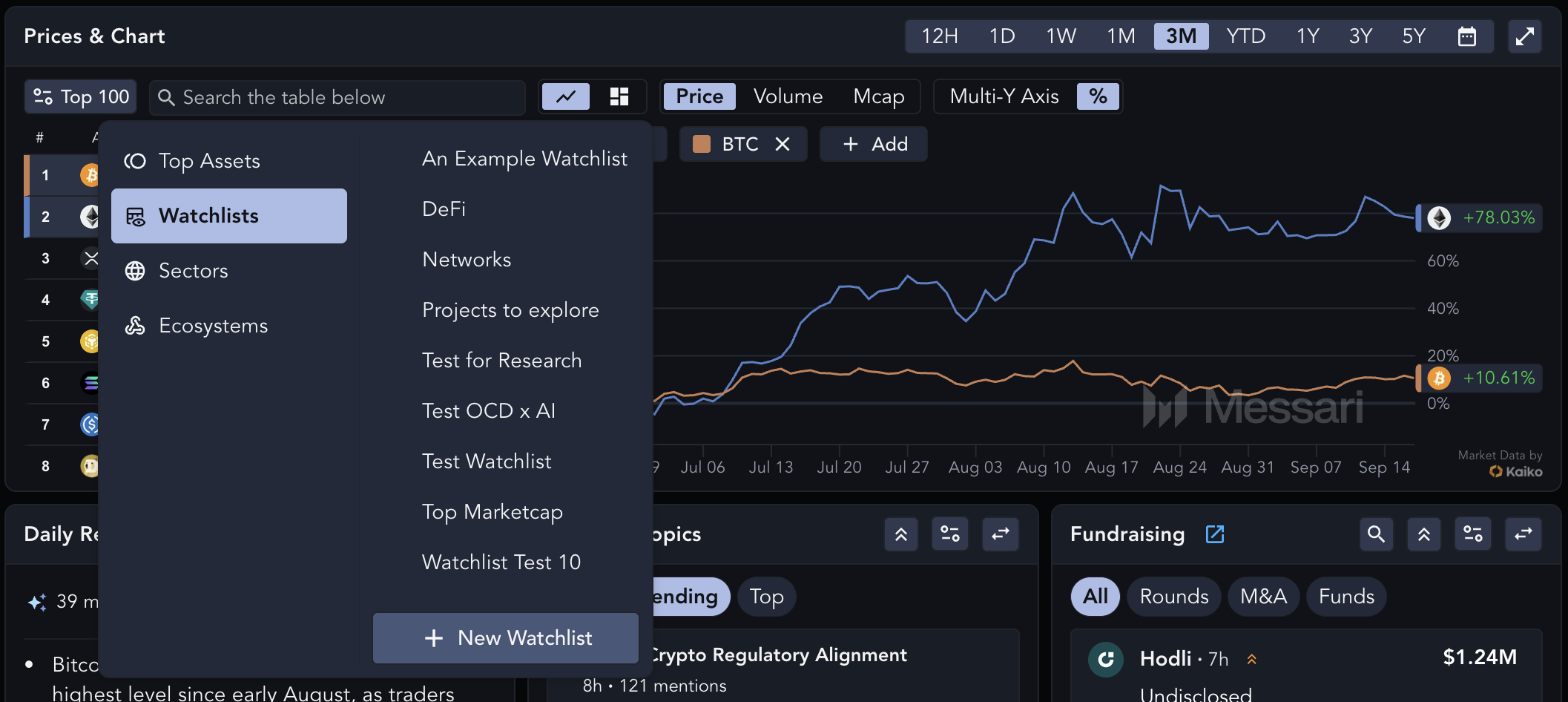
On the Homepage, users are able to cycle through their existing Watchlists, or under the same dropdown you can select `Create New Watchlist`.
 ## **Watchlist page**
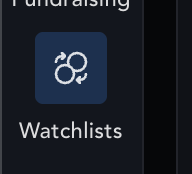
Navigate to `Watchlists` at the left-side of your Messari dashboard for a larger view of price performance and to create new Watchlists.
## **Watchlist page**
Navigate to `Watchlists` at the left-side of your Messari dashboard for a larger view of price performance and to create new Watchlists.
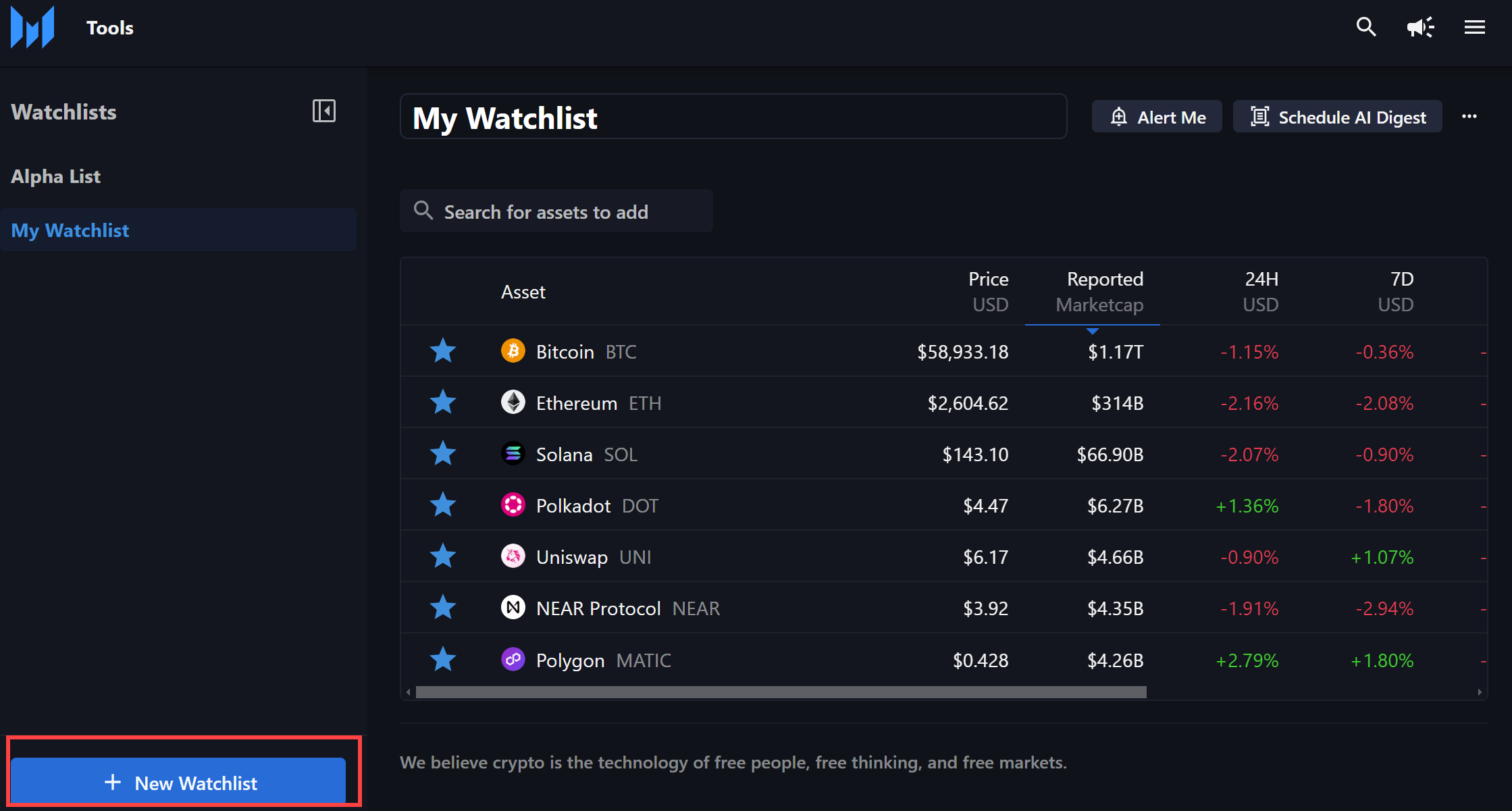
 Click on the blue `+ New Watchlist` button in the lower left-hand corner of the page to create a new Watchlist.
Provide a name and select `Create Watchlist`. If you've created multiple watchlists, you'll be able to navigate between them using the side-navigation menu.
Click on the blue `+ New Watchlist` button in the lower left-hand corner of the page to create a new Watchlist.
Provide a name and select `Create Watchlist`. If you've created multiple watchlists, you'll be able to navigate between them using the side-navigation menu.
 # **Editing Watchlists**
## **Adding Assets to Watchlists**
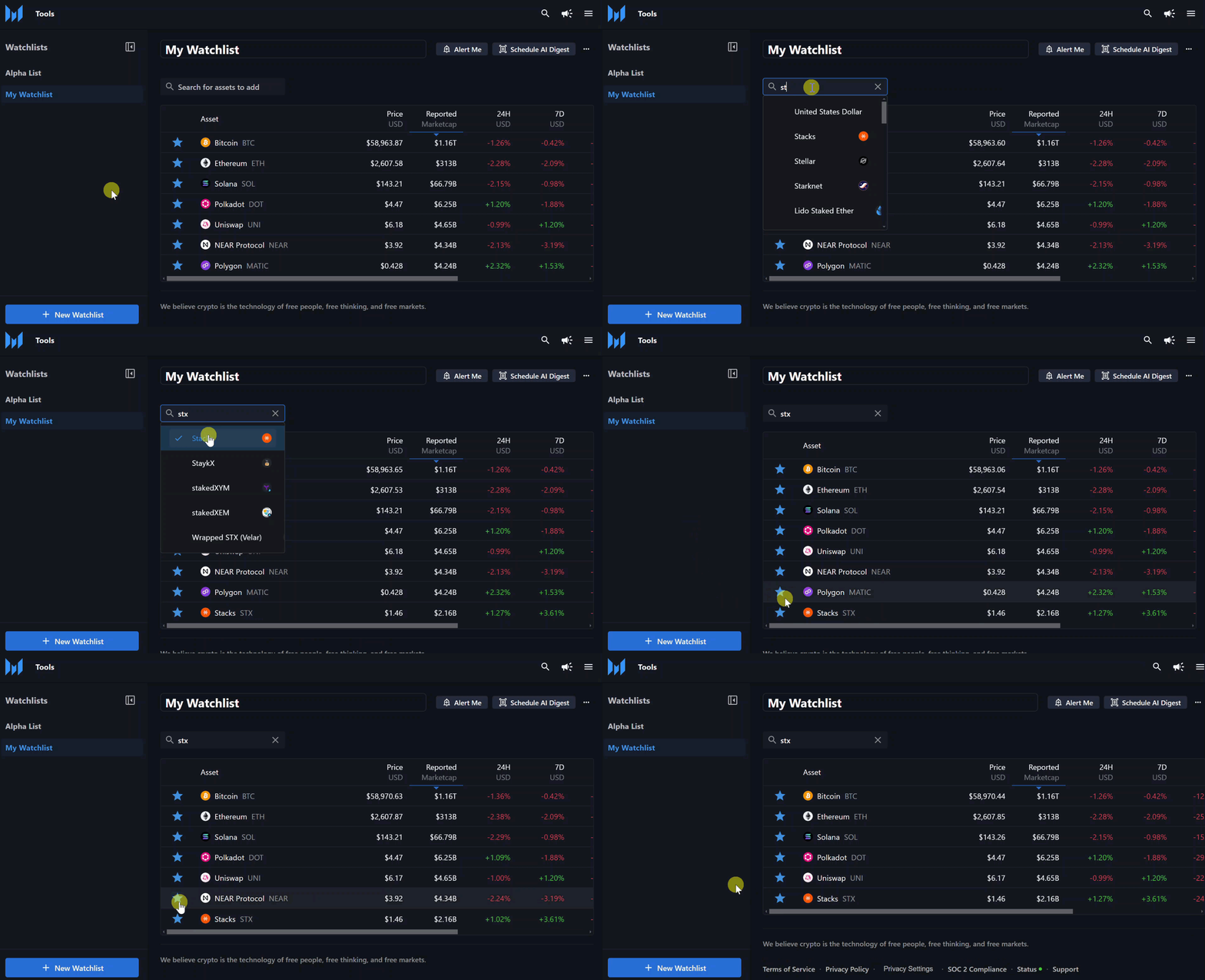
To add new assets, use the search bar located on the top of the page to search for the asset of interest.
## **Removing Assets from a Watchlist**
To remove an asset you can uncheck the asset while using the search bar or click the Star icon next to the asset's name. See the Bulk Edit section below for larger changes.
# **Editing Watchlists**
## **Adding Assets to Watchlists**
To add new assets, use the search bar located on the top of the page to search for the asset of interest.
## **Removing Assets from a Watchlist**
To remove an asset you can uncheck the asset while using the search bar or click the Star icon next to the asset's name. See the Bulk Edit section below for larger changes.
 ## **Renaming a Watchlist**
To rename a watchlist, select the More icon at the top of the page and click "Rename Watchlist."
## **Bulk Edits**
To perform bulk edits, select the More icon at the top of the page and click "Bulk Edit." Two icons will appear at the top of the watchlist:
### **Copy assets to another Watchlist**
Select the assets you'd like to copy, then press the Copy icon at the top of the watchlist. Click the Star icon next to each watchlist you'd like those assets to be added to, or click "+ New Watchlist" to create additional watchlists.
### **Delete assets**
Select the assets you'd like to delete, then press the Trashcan icon at the top of the watchlist.
***
# **Messari AI Digests**
Messari AI Watchlist Digests use Messari AI to create personalized summaries for users to monitor assets in their watchlists across market data, intel events, governance proposals, and recent news. AI Digests can be sent via email or accessed directly on Messari.
## **Schedule a Watchlist Digest**
The `Schedule AI Digest` button can be found on the Watchlists page. First, choose which inputs you would like included in your curated summary: Key Developments, Governance, Research Reports, and/or News. Next, choose whether you would like to receive a Daily or Weekly summary delivered directly to your Inbox.
## **Update Digest Preferences**
From the Homepage or Watchlist page, first select `Read AI Digest`, then click on `Update Digest Preferences` in the bottom left corner.
## **Renaming a Watchlist**
To rename a watchlist, select the More icon at the top of the page and click "Rename Watchlist."
## **Bulk Edits**
To perform bulk edits, select the More icon at the top of the page and click "Bulk Edit." Two icons will appear at the top of the watchlist:
### **Copy assets to another Watchlist**
Select the assets you'd like to copy, then press the Copy icon at the top of the watchlist. Click the Star icon next to each watchlist you'd like those assets to be added to, or click "+ New Watchlist" to create additional watchlists.
### **Delete assets**
Select the assets you'd like to delete, then press the Trashcan icon at the top of the watchlist.
***
# **Messari AI Digests**
Messari AI Watchlist Digests use Messari AI to create personalized summaries for users to monitor assets in their watchlists across market data, intel events, governance proposals, and recent news. AI Digests can be sent via email or accessed directly on Messari.
## **Schedule a Watchlist Digest**
The `Schedule AI Digest` button can be found on the Watchlists page. First, choose which inputs you would like included in your curated summary: Key Developments, Governance, Research Reports, and/or News. Next, choose whether you would like to receive a Daily or Weekly summary delivered directly to your Inbox.
## **Update Digest Preferences**
From the Homepage or Watchlist page, first select `Read AI Digest`, then click on `Update Digest Preferences` in the bottom left corner.
.png?fit=max&auto=format&n=yyxNenUedrcypjcZ&q=85&s=10b59856e4550e5c92868fb75c119b4e "Dcf7b26f648178da7021d70f03383131c4ae710fc311529026afece6f4cac0f5 Image(3) Pn") The Edit Digest view allows you to update the content you would like to receive or the delivery schedule. Use the `Unsubscribe` button in the bottom left corner to deactivate a digest.
***
# **Watchlists Hot Tips and Best Practices**
* Create as many Watchlists as needed, such as one for current holdings, one for potential investments, and some for sectors of focus.
* Activate your Messari AI Watchlist Digest to receive daily or weekly updates on your Watchlist assets.
***
# **Watchlists FAQs**
### **Can I make bulk edits, such as deleting multiple assets, to my Watchlist?**
Yes, click the `More` icon at the top of the Watchlist page and select "Bulk Edit" to copy or delete assets across multiple Watchlists.
### **What are the benefits of using Watchlists on News and Research pages?**
Watchlists streamline the process of reviewing [News](https://messari.io/news) and [Research](https://messari.io/research) by providing only those articles or reports that are tagged to the assets in your custom Watchlist. This saves time by bringing key information to the forefront and filtering out irrelevant (to the user) information.
### **What are Key Development alerts and what does it have to do with my Watchlist?**
[Key Developments](https://messari.io/intel) alerting tracks hundreds of protocols for every major event that takes place. By first creating a Watchilist you can filter these events for only the assets that are important to you.
The Edit Digest view allows you to update the content you would like to receive or the delivery schedule. Use the `Unsubscribe` button in the bottom left corner to deactivate a digest.
***
# **Watchlists Hot Tips and Best Practices**
* Create as many Watchlists as needed, such as one for current holdings, one for potential investments, and some for sectors of focus.
* Activate your Messari AI Watchlist Digest to receive daily or weekly updates on your Watchlist assets.
***
# **Watchlists FAQs**
### **Can I make bulk edits, such as deleting multiple assets, to my Watchlist?**
Yes, click the `More` icon at the top of the Watchlist page and select "Bulk Edit" to copy or delete assets across multiple Watchlists.
### **What are the benefits of using Watchlists on News and Research pages?**
Watchlists streamline the process of reviewing [News](https://messari.io/news) and [Research](https://messari.io/research) by providing only those articles or reports that are tagged to the assets in your custom Watchlist. This saves time by bringing key information to the forefront and filtering out irrelevant (to the user) information.
### **What are Key Development alerts and what does it have to do with my Watchlist?**
[Key Developments](https://messari.io/intel) alerting tracks hundreds of protocols for every major event that takes place. By first creating a Watchilist you can filter these events for only the assets that are important to you.