> ## Documentation Index
> Fetch the complete documentation index at: https://docs.messari.io/llms.txt
> Use this file to discover all available pages before exploring further.
# My Account
# Account Management Overview
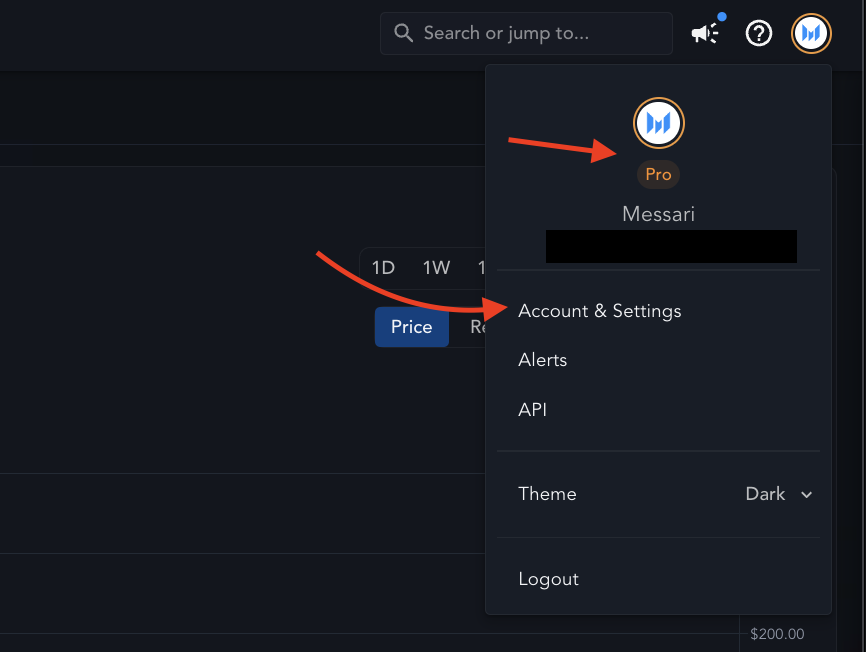
Access your account settings, subscription details, and billing information from the account menu in the top right corner of the platform.
To view and manage these details, click [**Account & Settings**](https://messari.io/account). From this menu, you can quickly check your current subscription plan:
 # **Logging In**
## **How do I log in with Google SSO?**
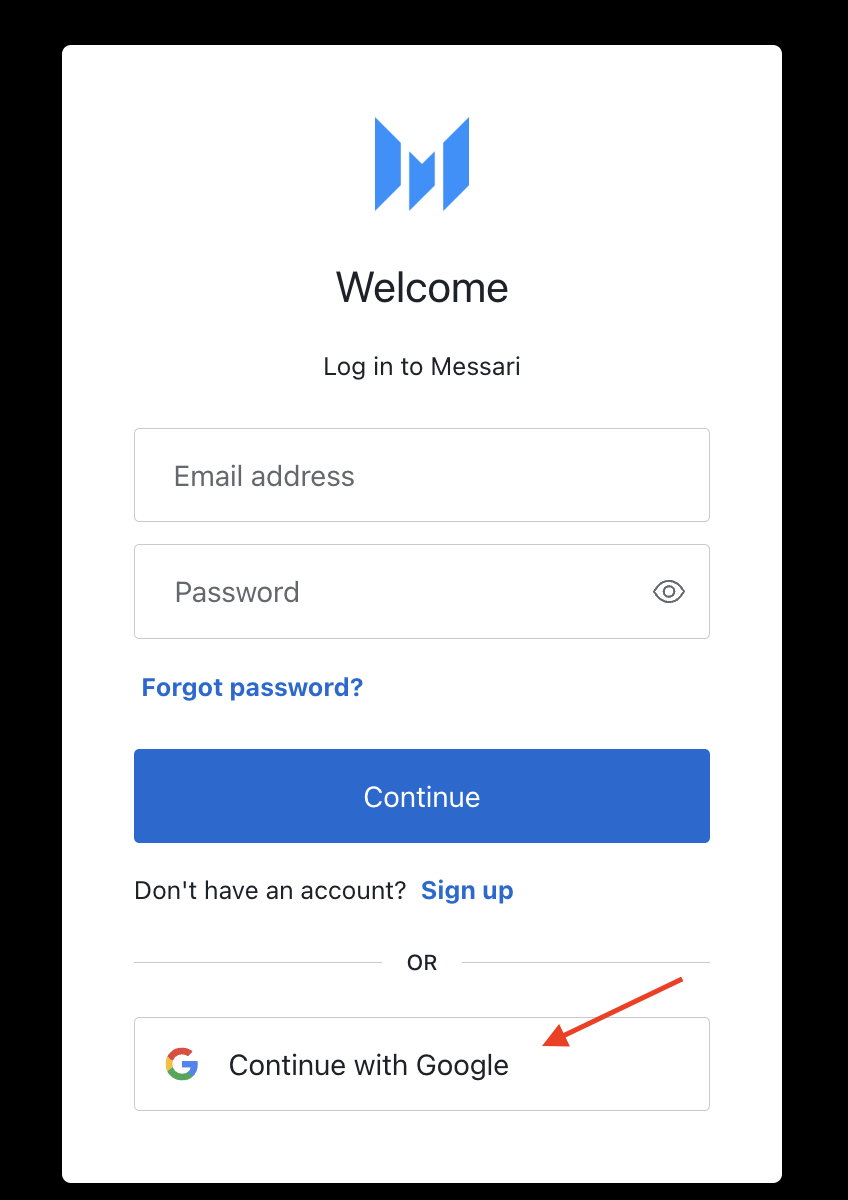
To log in using Google Single-Sign On (SSO), click **Log In** > **Continue with Google** and select the Google account associated with your Messari account.
# **Logging In**
## **How do I log in with Google SSO?**
To log in using Google Single-Sign On (SSO), click **Log In** > **Continue with Google** and select the Google account associated with your Messari account.
 # **Change Email/Password**
## **How can I change my email address?**
To update your email address, please [contact our Support Team](https://docs.messari.io/user-guides/welcome/contact-us), and they will assist you.
## **How do I change my password?**
If you created your account using an email address and password, click `Forgot Password?` on the Log In page to start the password reset process. You will receive an email with instructions.
If you use Google SSO, no password is required. Simply log in using Google SSO.
## **I’m not receiving the password reset email. What should I do?**
Check your Spam or Trash folders, as the password reset email may have been flagged as spam. If you use Google SSO, you won't receive a password reset email; simply use Google SSO to log in.
For more help, [contact our Support Team](https://docs.messari.io/user-guides/welcome/contact-us).
# **Billing**
## **What payment methods are accepted?**
We accept credit cards and debit cards. Prepaid debit cards are also accepted, provided they have sufficient funds.
## **How can I update my billing information?**
You can update your billing details by navigating to **Account & Settings** > **Billing Details** or by clicking [this link](https://messari.io/account/billing) while logged into your Messari account.
## **How can I access my billing history?**
Past invoices are available for download under **Account & Settings** > **Billing History**. Here, you can view and download all prior invoices associated with your account.
## **How do I request a copy of my invoice?**
To receive a copy of your invoice, please [contact our Support Team](https://docs.messari.io/user-guides/welcome/contact-us). If you would like invoices to be sent to you automatically, let us know, and we will enable email notifications for future invoices.
# **Canceling Your Subscription**
## **How do I cancel my subscription?**
Go to **Account & Settings** > **Subscription Plan** to cancel subscription. You will continue to have access to your paid features until the current billing period ends.
## **When will my access end after canceling?**
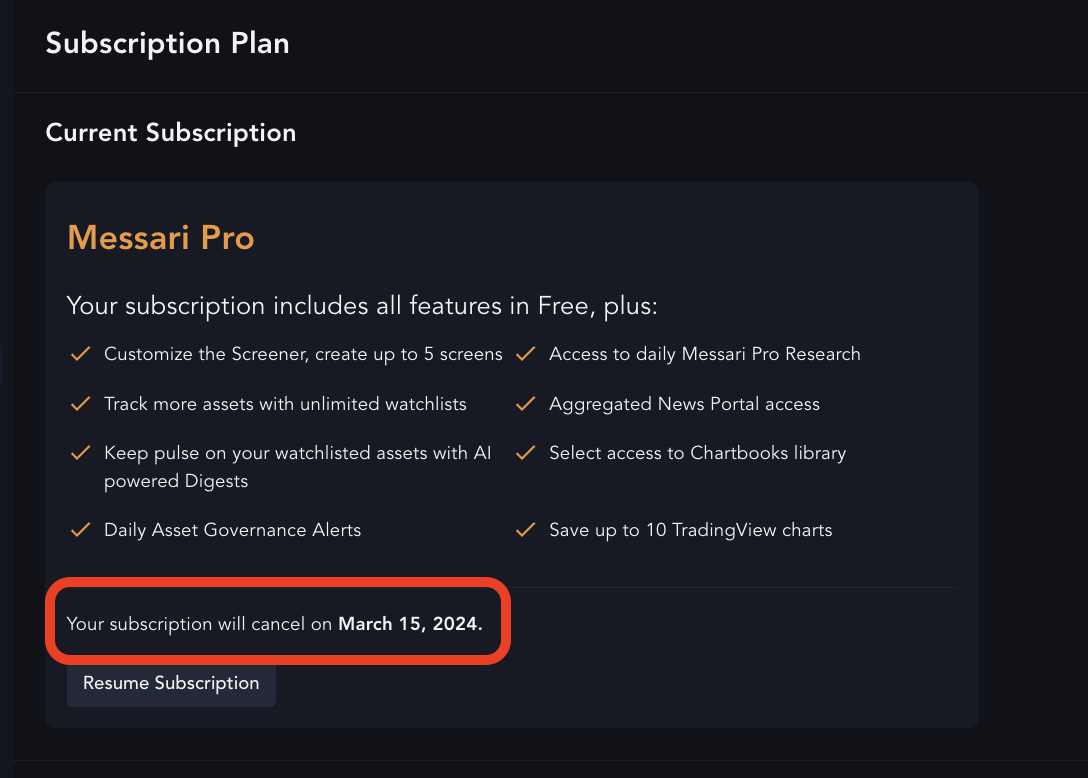
You can view the end date of your subscription in **Account & Settings** > **Subscription Plan**.
# **Change Email/Password**
## **How can I change my email address?**
To update your email address, please [contact our Support Team](https://docs.messari.io/user-guides/welcome/contact-us), and they will assist you.
## **How do I change my password?**
If you created your account using an email address and password, click `Forgot Password?` on the Log In page to start the password reset process. You will receive an email with instructions.
If you use Google SSO, no password is required. Simply log in using Google SSO.
## **I’m not receiving the password reset email. What should I do?**
Check your Spam or Trash folders, as the password reset email may have been flagged as spam. If you use Google SSO, you won't receive a password reset email; simply use Google SSO to log in.
For more help, [contact our Support Team](https://docs.messari.io/user-guides/welcome/contact-us).
# **Billing**
## **What payment methods are accepted?**
We accept credit cards and debit cards. Prepaid debit cards are also accepted, provided they have sufficient funds.
## **How can I update my billing information?**
You can update your billing details by navigating to **Account & Settings** > **Billing Details** or by clicking [this link](https://messari.io/account/billing) while logged into your Messari account.
## **How can I access my billing history?**
Past invoices are available for download under **Account & Settings** > **Billing History**. Here, you can view and download all prior invoices associated with your account.
## **How do I request a copy of my invoice?**
To receive a copy of your invoice, please [contact our Support Team](https://docs.messari.io/user-guides/welcome/contact-us). If you would like invoices to be sent to you automatically, let us know, and we will enable email notifications for future invoices.
# **Canceling Your Subscription**
## **How do I cancel my subscription?**
Go to **Account & Settings** > **Subscription Plan** to cancel subscription. You will continue to have access to your paid features until the current billing period ends.
## **When will my access end after canceling?**
You can view the end date of your subscription in **Account & Settings** > **Subscription Plan**.
 # **Deleting Your Account**
## **How can I delete my account and associated data?**
While logged into your Messari account, go to **Account & Settings** > **Account Details**. Click `Delete My Data` to be redirected to our [Privacy Request Form](https://preferences.messari.io/privacy). Once submitted, you'll receive an email to verify the email address you provided. After you've done so, the data deletion process will begin.
**Note:** Please make sure you cancel any active Enterprise subscriptions before submitting the deletion request.
For more information, refer to our [Privacy Policy](https://messari.s3.amazonaws.com/privacy.html) or [contact our Support Team](https://docs.messari.io/user-guides/welcome/contact-us) if you need assistance.
# **Additional Information**
Please review our [Terms of Service](https://messari.s3.amazonaws.com/termsofuse.html) and [Privacy Policy](https://messari.io/privacy-policy) for additional information. You can adjust your Privacy Settings by clicking `Privacy Settings` in the platform's footer at [https://messari.io](https://messari.io).
# **Deleting Your Account**
## **How can I delete my account and associated data?**
While logged into your Messari account, go to **Account & Settings** > **Account Details**. Click `Delete My Data` to be redirected to our [Privacy Request Form](https://preferences.messari.io/privacy). Once submitted, you'll receive an email to verify the email address you provided. After you've done so, the data deletion process will begin.
**Note:** Please make sure you cancel any active Enterprise subscriptions before submitting the deletion request.
For more information, refer to our [Privacy Policy](https://messari.s3.amazonaws.com/privacy.html) or [contact our Support Team](https://docs.messari.io/user-guides/welcome/contact-us) if you need assistance.
# **Additional Information**
Please review our [Terms of Service](https://messari.s3.amazonaws.com/termsofuse.html) and [Privacy Policy](https://messari.io/privacy-policy) for additional information. You can adjust your Privacy Settings by clicking `Privacy Settings` in the platform's footer at [https://messari.io](https://messari.io).